1
2
3
4
5
6
7
8
9
10
11
12
13
14
15
16
17
18
19
20
21
22
23
24
25
26
27
28
29
30
31
32
33
34
35
36
37
38
39
40
41
42
43
44
45
46
47
48
49
50
51
52
53
54
55
56
57
58
59
60
61
62
63
64
65
66
67
68
69
70
71
72
73
74
75
76
77
78
79
80
81
82
83
84
85
86
87
88
89
90
91
92
93
94
95
96
97
98
99
100
101
102
103
104
105
106
107
108
109
110
111
112
113
114
115
116
117
118
119
120
121
122
123
124
125
126
127
128
129
130
131
132
133
134
135
136
137
138
139
140
141
142
143
144
145
146
147
148
149
150
151
152
153
154
155
156
157
158
159
160
161
162
163
164
165
166
167
168
169
170
171
172
173
174
175
176
177
178
179
180
181
182
183
184
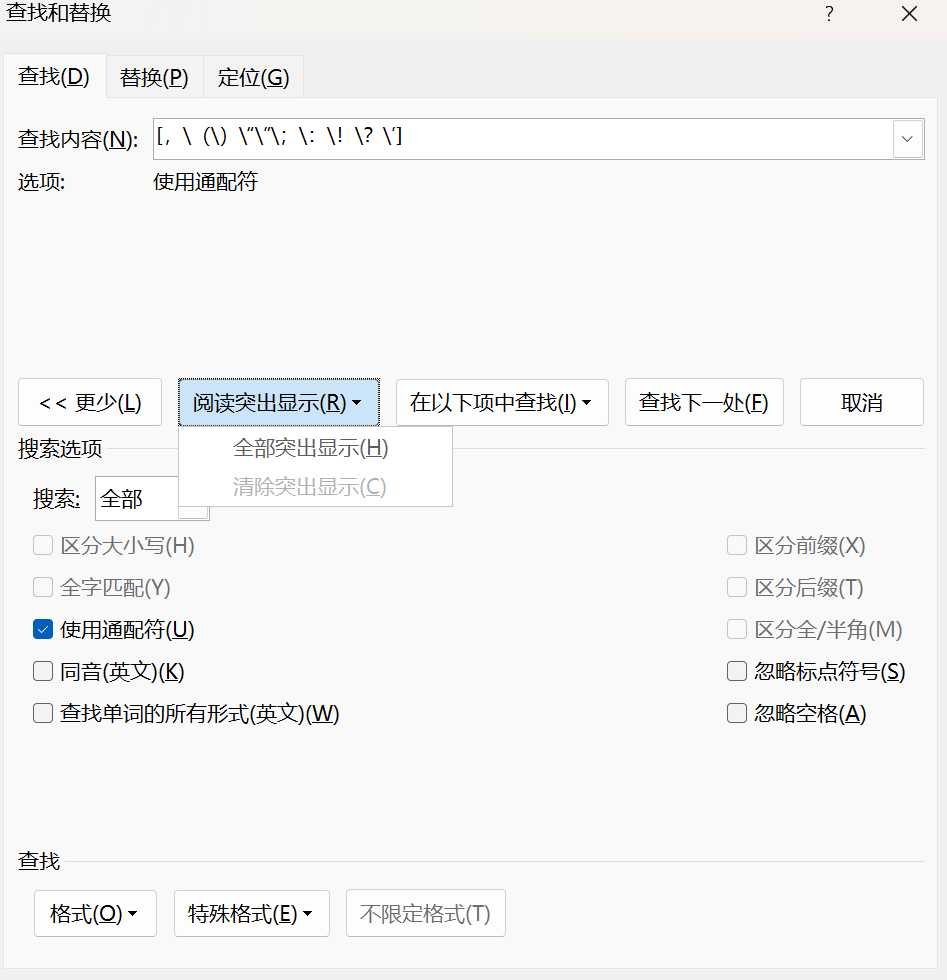
| Sub 一键切换中文英文标点()
Dim scope As Range
Dim action As VbMsgBoxResult
Dim findList As Variant
Dim replaceList As Variant
Dim i As Long
Dim rng As Range
Dim useLeftQuote As Boolean
Dim prevChar As String
Dim nextChar As String
Dim pc As Long
Dim nc As Long
Dim msg As String
Dim title As String
msg = ChrW(&H662F) & ChrW(&HFF1A) & ChrW(&H8F6C) & ChrW(&H82F1) & ChrW(&H6587) & ChrW(&H534A) & ChrW(&H89D2)
msg = msg & vbCrLf & ChrW(&H5426) & ChrW(&HFF1A) & ChrW(&H8F6C) & ChrW(&H4E2D) & ChrW(&H6587) & ChrW(&H5168) & ChrW(&H89D2)
msg = msg & vbCrLf & ChrW(&H53D6) & ChrW(&H6D88) & ChrW(&HFF1A) & ChrW(&H9000) & ChrW(&H51FA)
title = ChrW(&H9009) & ChrW(&H62E9) & ChrW(&H8F6C) & ChrW(&H6362) & ChrW(&H65B9) & ChrW(&H5411)
action = MsgBox(msg, vbYesNoCancel + vbQuestion, title)
If action = vbCancel Then Exit Sub
If Selection.Range.Start <> Selection.Range.End Then
Set scope = Selection.Range.Duplicate
Else
Set scope = ActiveDocument.Content.Duplicate
End If
On Error GoTo SafeExit
Application.ScreenUpdating = False
If action = vbYes Then
findList = Array(ChrW(&H2026) & ChrW(&H2026), ChrW(&H2014) & ChrW(&H2014), ChrW(&HFF0C), ChrW(&H3002), ChrW(&HFF0E), ChrW(&H3001), _
ChrW(&HFF1B), ChrW(&HFF1A), ChrW(&HFF01), ChrW(&HFF1F), ChrW(&HFF08), ChrW(&HFF09), _
ChrW(&HFF3B), ChrW(&HFF3D), ChrW(&HFF5B), ChrW(&HFF5D), ChrW(&H3010), ChrW(&H3011), _
ChrW(&H3014), ChrW(&H3015), ChrW(&H300A), ChrW(&H300B), ChrW(&H3008), ChrW(&H3009), _
ChrW(&H201C), ChrW(&H201D), ChrW(&H2018), ChrW(&H2019), ChrW(&H300C), ChrW(&H300D), _
ChrW(&H300E), ChrW(&H300F), ChrW(&H2014), ChrW(&H2026), ChrW(&HB7), ChrW(&HFF5E), _
ChrW(&HFFE5), ChrW(&HFF05), ChrW(&HFF03), ChrW(&HFF06), ChrW(&HFF20), ChrW(&HFF0B), _
ChrW(&HFF1D), ChrW(&HFF3F), ChrW(&HFF0F), ChrW(&HFF3C), ChrW(&HFF5C), ChrW(&HFF07), _
ChrW(&HFF02), ChrW(&HFF40), ChrW(&H3000))
replaceList = Array(ChrW(46) & ChrW(46) & ChrW(46), ChrW(45) & ChrW(45), ChrW(44), ChrW(46), ChrW(46), ChrW(44), _
ChrW(59), ChrW(58), ChrW(33), ChrW(63), ChrW(40), ChrW(41), ChrW(91), ChrW(93), _
ChrW(123), ChrW(125), ChrW(91), ChrW(93), ChrW(91), ChrW(93), ChrW(60), ChrW(62), _
ChrW(60), ChrW(62), ChrW(34), ChrW(34), ChrW(39), ChrW(39), ChrW(34), ChrW(34), _
ChrW(39), ChrW(39), ChrW(45), ChrW(46) & ChrW(46) & ChrW(46), ChrW(46), ChrW(126), _
ChrW(&HA5), ChrW(37), ChrW(35), ChrW(38), ChrW(64), ChrW(43), ChrW(61), ChrW(95), _
ChrW(47), ChrW(92), ChrW(124), ChrW(39), ChrW(34), ChrW(96), ChrW(32))
For i = LBound(findList) To UBound(findList)
Set rng = scope.Duplicate
With rng.Find
.ClearFormatting
.Replacement.ClearFormatting
.Text = CStr(findList(i))
.Replacement.Text = CStr(replaceList(i))
.Forward = True
.Wrap = wdFindStop
.Format = False
.MatchWildcards = False
.MatchCase = False
.MatchWholeWord = False
.MatchSoundsLike = False
.MatchAllWordForms = False
.Execute Replace:=wdReplaceAll
End With
Next i
MsgBox ChrW(&H5B8C) & ChrW(&H6210) & ChrW(&HFF1A) & ChrW(&H5DF2) & ChrW(&H8F6C) & ChrW(&H6362) & ChrW(&H4E3A) & ChrW(&H82F1) & ChrW(&H6587) & ChrW(47) & ChrW(&H534A) & ChrW(&H89D2) & ChrW(&H6807) & ChrW(&H70B9) & ChrW(&H3002), vbInformation
ElseIf action = vbNo Then
findList = Array(ChrW(46) & ChrW(46) & ChrW(46), ChrW(45) & ChrW(45), ChrW(44), ChrW(46), ChrW(59), ChrW(58), _
ChrW(33), ChrW(63), ChrW(40), ChrW(41), ChrW(91), ChrW(93), ChrW(123), ChrW(125), _
ChrW(60), ChrW(62), ChrW(126), ChrW(&HA5), ChrW(37), ChrW(35), ChrW(38), ChrW(64), _
ChrW(43), ChrW(61), ChrW(95), ChrW(47), ChrW(92), ChrW(124), ChrW(96))
replaceList = Array(ChrW(&H2026) & ChrW(&H2026), ChrW(&H2014) & ChrW(&H2014), ChrW(&HFF0C), ChrW(&H3002), ChrW(&HFF1B), ChrW(&HFF1A), _
ChrW(&HFF01), ChrW(&HFF1F), ChrW(&HFF08), ChrW(&HFF09), ChrW(&HFF3B), ChrW(&HFF3D), _
ChrW(&HFF5B), ChrW(&HFF5D), ChrW(&H300A), ChrW(&H300B), ChrW(&HFF5E), ChrW(&HFFE5), _
ChrW(&HFF05), ChrW(&HFF03), ChrW(&HFF06), ChrW(&HFF20), ChrW(&HFF0B), ChrW(&HFF1D), _
ChrW(&HFF3F), ChrW(&HFF0F), ChrW(&HFF3C), ChrW(&HFF5C), ChrW(&HFF40))
For i = LBound(findList) To UBound(findList)
Set rng = scope.Duplicate
With rng.Find
.ClearFormatting
.Replacement.ClearFormatting
.Text = CStr(findList(i))
.Replacement.Text = CStr(replaceList(i))
.Forward = True
.Wrap = wdFindStop
.Format = False
.MatchWildcards = False
.MatchCase = False
.MatchWholeWord = False
.MatchSoundsLike = False
.MatchAllWordForms = False
.Execute Replace:=wdReplaceAll
End With
Next i
Set rng = scope.Duplicate
useLeftQuote = True
With rng.Find
.ClearFormatting
.Replacement.ClearFormatting
.Text = ChrW(34)
.Forward = True
.Wrap = wdFindStop
.Format = False
.MatchWildcards = False
End With
Do While rng.Find.Execute
If useLeftQuote Then
rng.Text = ChrW(&H201C)
Else
rng.Text = ChrW(&H201D)
End If
useLeftQuote = Not useLeftQuote
rng.Collapse wdCollapseEnd
Loop
Set rng = scope.Duplicate
useLeftQuote = True
With rng.Find
.ClearFormatting
.Replacement.ClearFormatting
.Text = ChrW(39)
.Forward = True
.Wrap = wdFindStop
.Format = False
.MatchWildcards = False
End With
Do While rng.Find.Execute
prevChar = vbNullString
nextChar = vbNullString
pc = 0
nc = 0
If rng.Start > 0 Then
prevChar = ActiveDocument.Range(Start:=rng.Start - 1, End:=rng.Start).Text
If Len(prevChar) > 0 Then pc = AscW(prevChar)
End If
If rng.End < ActiveDocument.Content.End Then
nextChar = ActiveDocument.Range(Start:=rng.End, End:=rng.End + 1).Text
If Len(nextChar) > 0 Then nc = AscW(nextChar)
End If
If (((pc >= 65 And pc <= 90) Or (pc >= 97 And pc <= 122) Or (pc >= 48 And pc <= 57)) And ((nc >= 65 And nc <= 90) Or (nc >= 97 And nc <= 122) Or (nc >= 48 And nc <= 57))) Then
rng.Text = ChrW(&H2019)
ElseIf useLeftQuote Then
rng.Text = ChrW(&H2018)
useLeftQuote = False
Else
rng.Text = ChrW(&H2019)
useLeftQuote = True
End If
rng.Collapse wdCollapseEnd
Loop
MsgBox ChrW(&H5B8C) & ChrW(&H6210) & ChrW(&HFF1A) & ChrW(&H5DF2) & ChrW(&H8F6C) & ChrW(&H6362) & ChrW(&H4E3A) & ChrW(&H4E2D) & ChrW(&H6587) & ChrW(47) & ChrW(&H5168) & ChrW(&H89D2) & ChrW(&H6807) & ChrW(&H70B9) & ChrW(&H3002), vbInformation
End If
SafeExit:
Application.ScreenUpdating = True
If Err.Number <> 0 Then
MsgBox ChrW(&H8FD0) & ChrW(&H884C) & ChrW(&H51FA) & ChrW(&H9519) & ChrW(&HFF1A) & Err.Description, vbExclamation
End If
End Sub
|