Cannot Find Relevant Literature? Two Fast Search Methods (CNKI + WOS)
This article introduces two methods for literature search: when you already have papers, expand the literature pool through CNKI citation networks or Inciteful.xyz; when you only have a topic, build and iteratively refine search queries with CNKI professional search and Web of Science advanced search. It includes operation steps, a query-generation prompt, and an optimization workflow using 5–20 seed papers.
I Also Panicked When the Search Returned Zero Results#
You have probably experienced this frustrating moment: you throw your topic into the search box, press Enter, and the result says “0 results!!!”
That moment really hurts. The topic seems interesting, so why is there no relevant literature? The problem is often not the topic itself, but that we have not used the right search method. Today we will talk about how to dig out literature that is buried deeper.
Often, this is not because we cannot search, but because our search posture is wrong. We will handle the two most common situations today:
you already have several related papers; 2) you only have a topic and no papers at all. Follow the workflow and you can usually get the literature pool rolling.
When You Already Have Several Papers: Follow the Citation Trail#
If your advisor has already sent several papers, or if you have found a few highly relevant ones yourself, things become much easier. Check which papers they cite, then read those cited papers. The literature pool will grow like a snowball.
Chinese literature: search on CNKI, open the detail page, scroll down, and find the “citation network.” Sections such as “secondary references,” “references,” and “co-cited literature” are all useful.
English literature: I recommend Inciteful.xyz. Enter a DOI or paper title and it will show a complete citation network graph.
When You Only Have a Topic: Use Search Queries to Locate Papers Precisely#
Now for the harder case: you only have a topic and no papers. Do not panic. This is when you should use “Professional Search” in CNKI and “Advanced Search” in WOS. They support Boolean logic, so you can combine multiple search terms, such as papers whose topic is “new energy vehicles” and whose keywords also include “price.”
On the homepage, click “Professional Search” next to “Advanced Search.”
If you are already on a search-results page, you can also find it at the top.
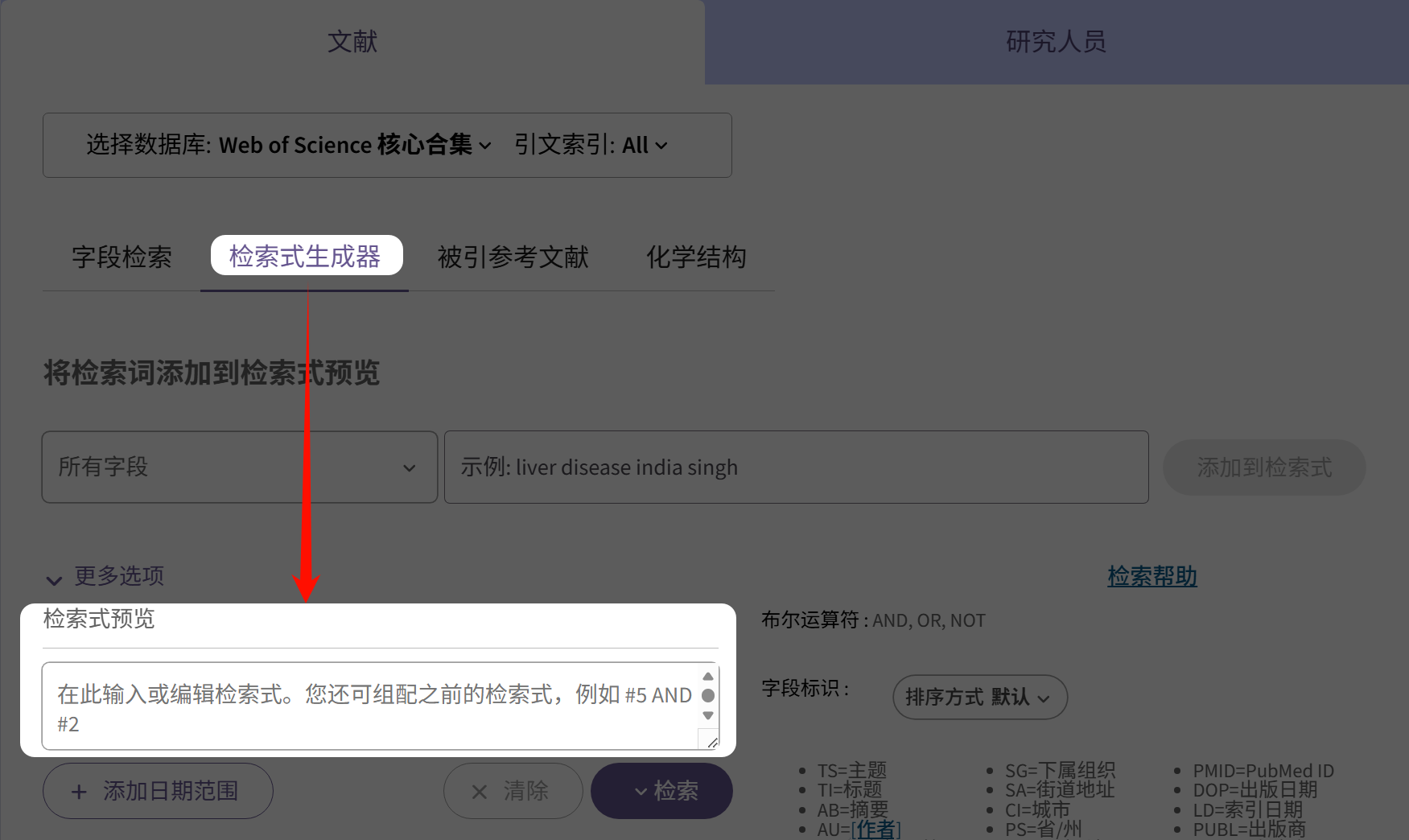
WOS Advanced Search:
The entry is visible directly at the top.I recommend using “Query Preview” under WOS “Query Builder,” which makes it easier to enter search strings.
Next, use the prompt below and input your research topic. If the result is not precise enough, add the discipline, research content, research object, and scenario. The more accurately you describe it, the more precise the search will be.
This prompt generates four search queries. Start with the first one. For CNKI, paste it into the Professional Search box; for WOS, paste it into Query Preview.
Select 5–20 papers that you think match the topic well.
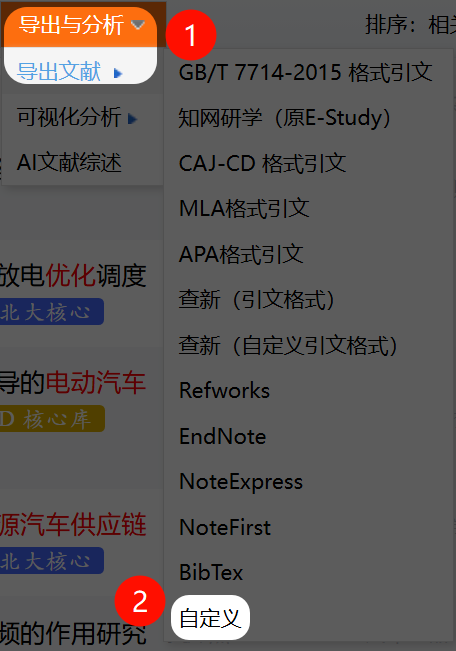
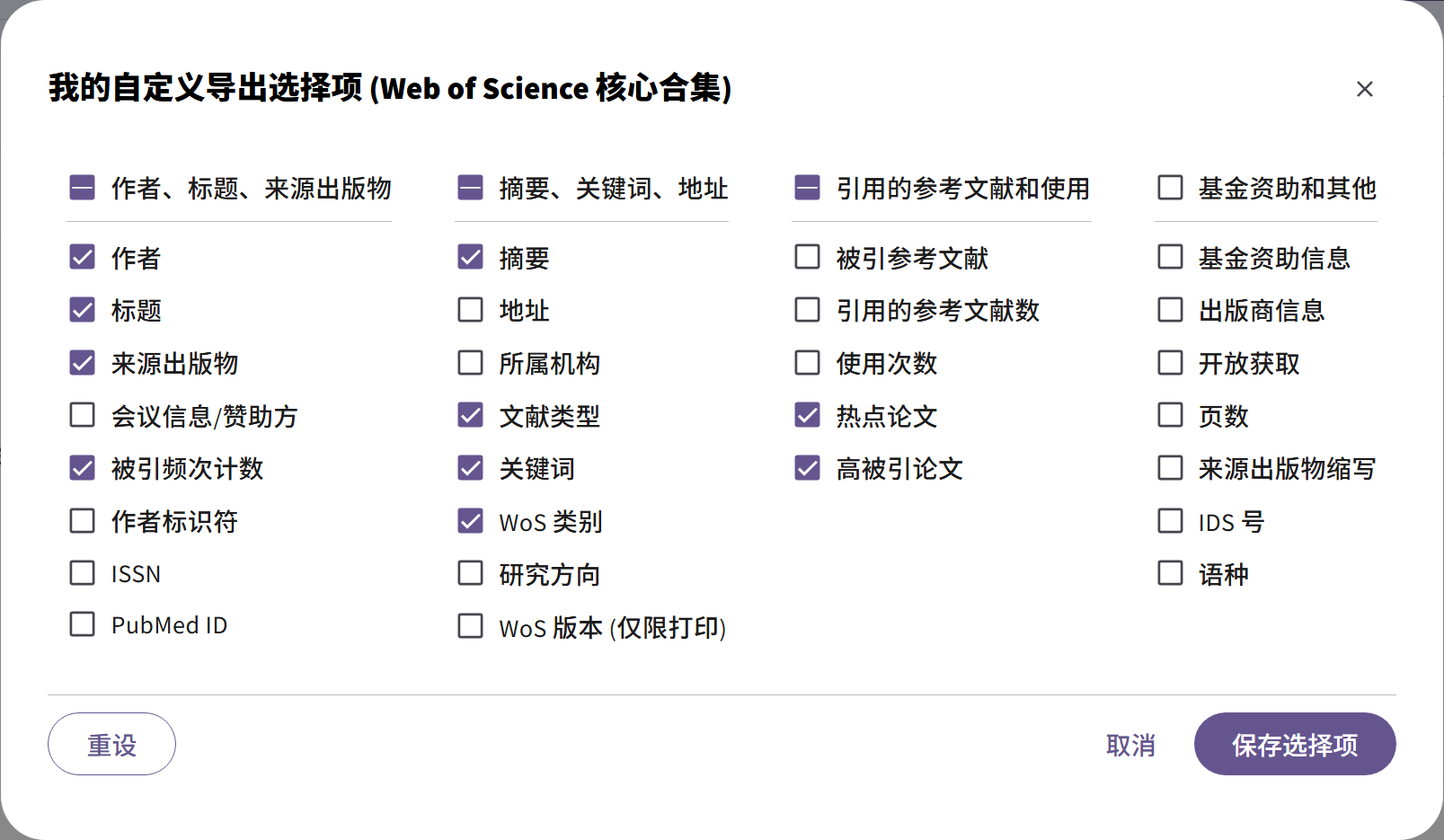
Click Export and Analyze → Export Literature → Customize.
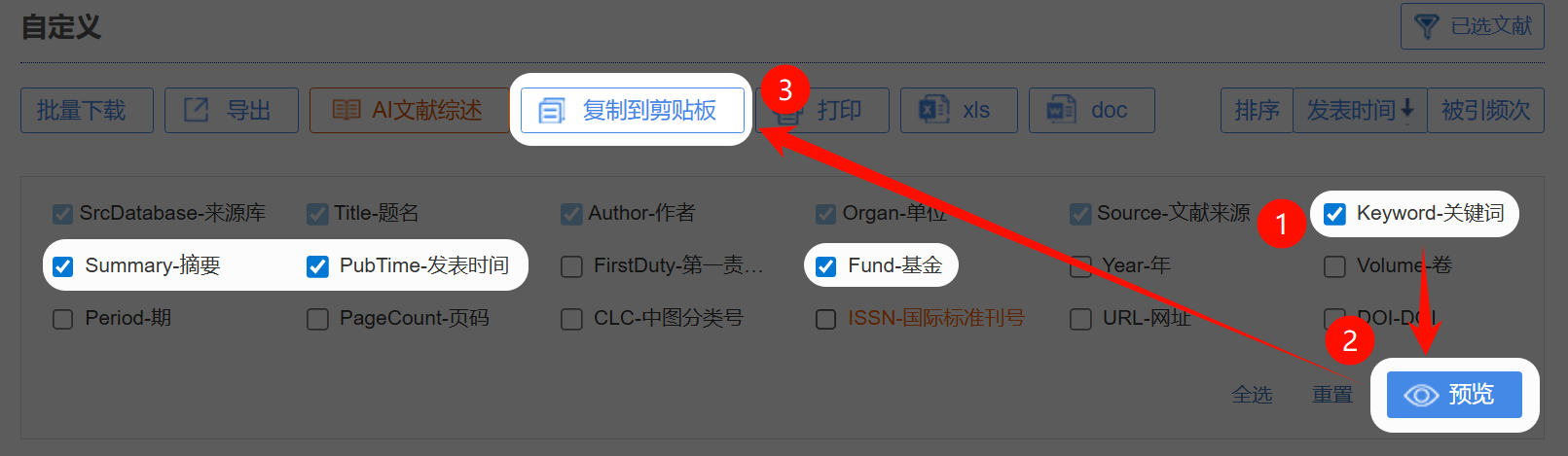
Check Keywords, Abstract, Publication Time, and Funding, click Preview, then click Copy to Clipboard.
Return to the AI chat and say: “I think keywords XX and XX should be kept (list the must-have keywords). The following CNKI papers are the ones I think fit the topic well.” Then paste the copied content.
Iterate like this, and the search query will become more precise.
WOS iteration method:
Select 5–20 highly relevant papers.
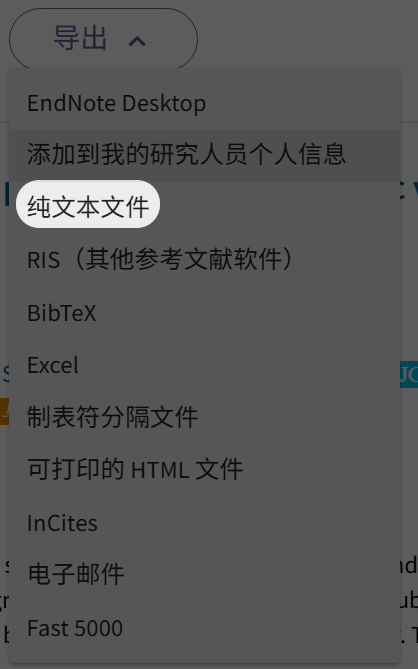
Click Export → Plain Text File → Record Content → Edit.
Check the following fields: authors, title, source publication, citation count, abstract, document type, keywords, WoS categories, hot papers, and highly cited papers.
Save the selection and export it to get a txt document.
Return to the chat, tell AI which keywords you want to keep, paste the exported content, and continue iterating.
Alternate the Two Methods, and the Literature Gets More Accurate#
Here is a small trick I often use: combine Method 1 and Method 2 to build a literature pool that keeps expanding.
Start with Method 2, the search query, to find several reasonably relevant papers. Even 3–5 papers are enough. Then switch to Method 1 and inspect their citation networks, expanding outward through their references and cited-by papers to find more related work.
From the expanded set, choose several papers that fit especially well, copy their keywords and abstracts, return to Method 2, and tell AI: “These are the most accurate papers I found. Help me optimize the search query.” AI will adjust the query based on them and make the results more precise.
Repeat this loop: use a query to find a few papers → expand through citation networks → optimize the query and search again → expand again. After two or three rounds, the literature pool is usually formed. This process continuously calibrates the direction and is much more efficient than using only one method.
A Good Search Query Helps You Find the Right Literature Quickly#
Literature search is ultimately about finding a path into a knowledge base. With these methods and tools, you no longer need to panic over “0 results.” Follow citation networks, or use search queries for precise targeting. One of these methods will help you find the literature you need. Try it, and you may find that literature is not as hard to locate as it seems.
A practical prompt-engineering guide that introduces a powerful meta-prompt for turning AI into a strategic advisor that clarifies requirements, asks better questions, and produces more reliable outputs.
This article introduces an efficient polishing prompt based on large language models. It improves the writing experience, provides a quick-use option, and offers model-selection suggestions for more efficient content creation.
A practical explanation of Spec-Driven Development (SDD): write What/Why and acceptance criteria as a living specification before asking AI to implement How. The article explains why vibe coding easily loses intent, and shows how SpecKit (Constitution → Specify → Plan → Tasks) fits 0→1 development while OpenSpec (proposal → apply → archive) fits 1→n iteration.
This article clarifies six often-confused AI tool concepts: Prompt handles temporary conversation instructions, Skills preserve standard workflows, MCP exposes external tools, Commands create shortcut templates, Agent runs autonomous loops, and Subagent isolates parallel tasks. It compares definitions, use cases, engineering cost, reuse, and decision criteria based on Anthropic documentation and LangChain-style agent concepts.
This article combines AI self-improvement with practical AI prompts and collects six deep self-questioning frameworks suitable for AI products with global memory: a brutal life-truth scanner, HUMAN 3.0 evaluation, ruthless debate partner, letter-writing decompression, legends versus ordinary people questions, and using AI to kill procrastination. It helps you use AI to see yourself more clearly and upgrade your lifestyle.
A step-by-step guide to bypassing the Claude Code extension login check and routing the plugin through Claude Code Router so it can connect to large-model services of your choice.
A Zotero PDF translation guide based on zotero-pdf2zh and PDFMathTranslate Next, covering Python and Docker deployments, plugin configuration, formula and figure preservation, and bilingual reading.
A Claude Code Router tutorial for Gemini, Kimi, DeepSeek, GLM, and Qwen, covering CCR configuration, PROXY_URL, Anthropic versus OpenAI endpoints, /model switching, and common errors.
A hands-on VS Code and Claude Code Router guide: configure CCR, set API keys in ccr ui, set ANTHROPIC_BASE_URL and ANTHROPIC_AUTH_TOKEN, then launch Claude inside VS Code.