
Introduction#
The main open-source tools for translating research papers today are pdf2zh (1.x) and pdf2zh-next (2.x). The latter moved to an organization repository on June 4, 2025, began iterating along the “next/2.0” line, and replaced its core with the BabelDOC translation engine. This review uses tests from a unified environment to compare the two generations vertically in user experience and overall cost, and also discusses two mainstream model paths under pdf2zh-next.
This review focuses on four dimensions:
- Translation quality: terminology, formulas, tables, images, and scanned-document handling
- Cost and speed: API cost and translation throughput
- Free quota/access: usability of built-in free translation paths
- Maintenance and activity: project status in the community
Introduction to the Tools#
What Is pdf2zh?#
PDFMathTranslate (pdf2zh) is an open-source professional PDF translation tool focused on full-text bilingual translation while preserving layout. It supports many translation/model services, such as Google, DeepL, Ollama, and OpenAI, and provides CLI, GUI, MCP, Docker, Zotero, and other usage modes for different environments.
What Is pdf2zh_next, and How Is It Different from pdf2zh?#
PDFMathTranslate-next (pdf2zh_next / pdf2zh 2.0) was renamed and moved to an organization repository on June 4, 2025 after being initiated by awwaawwa, then continued iterating as the “next” version. Compared with 1.x, the next version uses BabelDOC as its core translation engine. BabelDOC itself is an open-source document translation engine from the Immersive Translate team. On top of that, next adds more translation/model APIs and improves self-deployment, such as Docker support and packaged Windows executables.
Test Notes#
- Tested versions: pdf2zh v1.9.11 and pdf2zh_next-v2.6.4-BabelDOC-v0.5.9.
- Unified runtime: both were tested on Windows 11 using the official win.exe compressed packages, with no extra installation.
- Parameter settings: both used the default Prompt. In pdf2zh_next, I additionally enabled “no watermark,” “translate table text (experimental),” and “automatically enable OCR workaround”; all other settings stayed default.
- Samples: 10 PDF documents with different features, covering scanned files, vector images, complex tables, mathematical formulas, very long documents over 100 pages, and short documents under 5 pages.
Tutorials#
If you want tutorials, see my related posts and videos:
New-version tutorial: PDF2zh 2.0: Three Deployment Methods and Zotero Plugin Configuration & video tutorial Old-version tutorial: PDFMathTranslate: Preserve the Original Format! A Super Useful PDF Translation Tool Zotero tutorial: Zotero-pdf2zh: Quickly Translate PDFs and Preserve the Original Format & video tutorial
Part 1: Deep Comparison of Translation Quality#
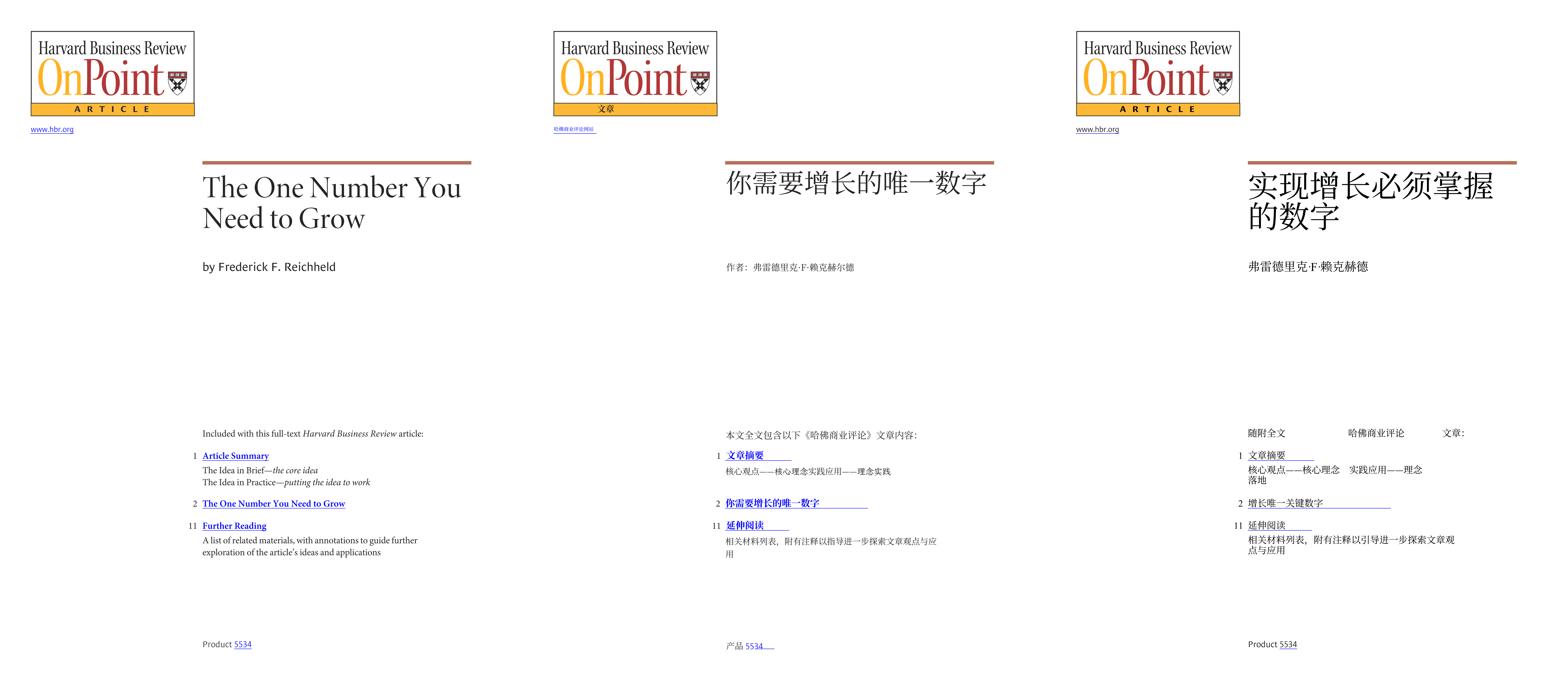
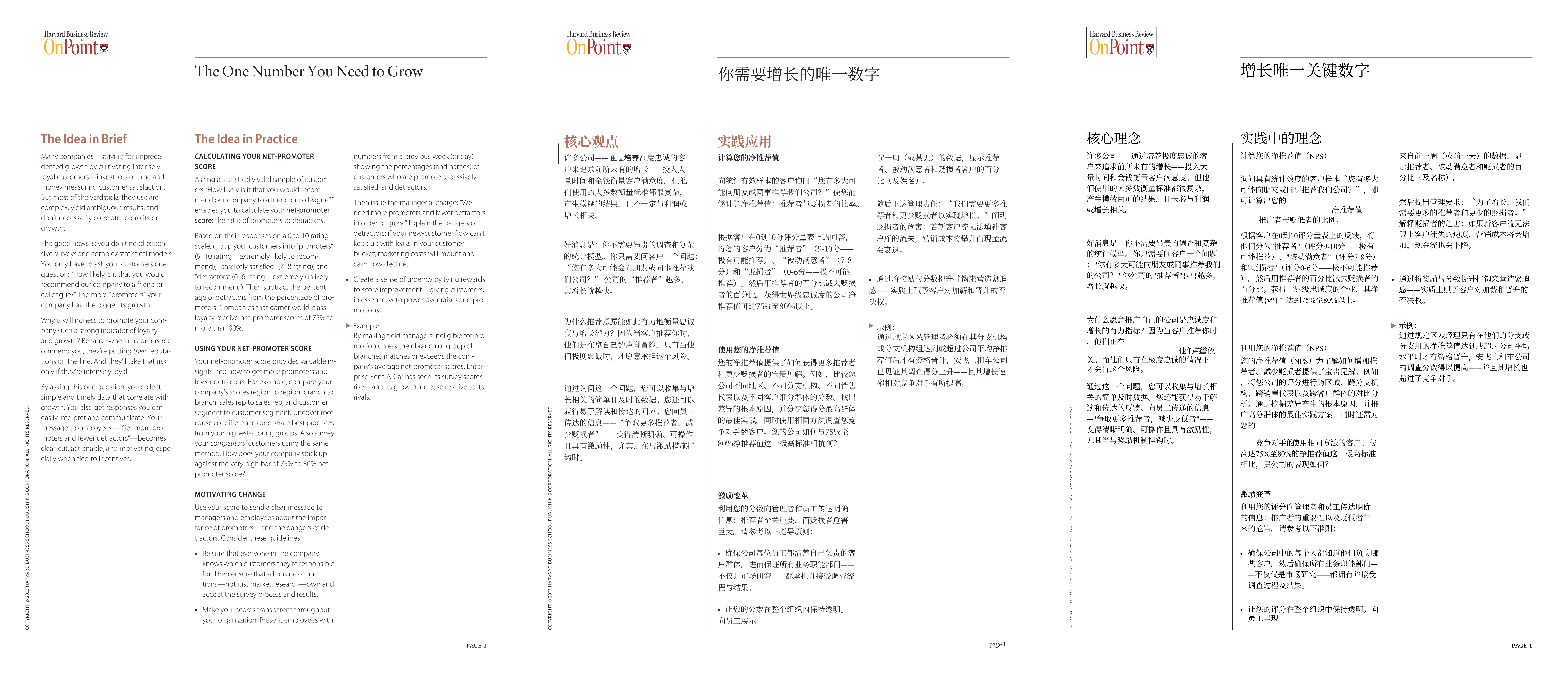
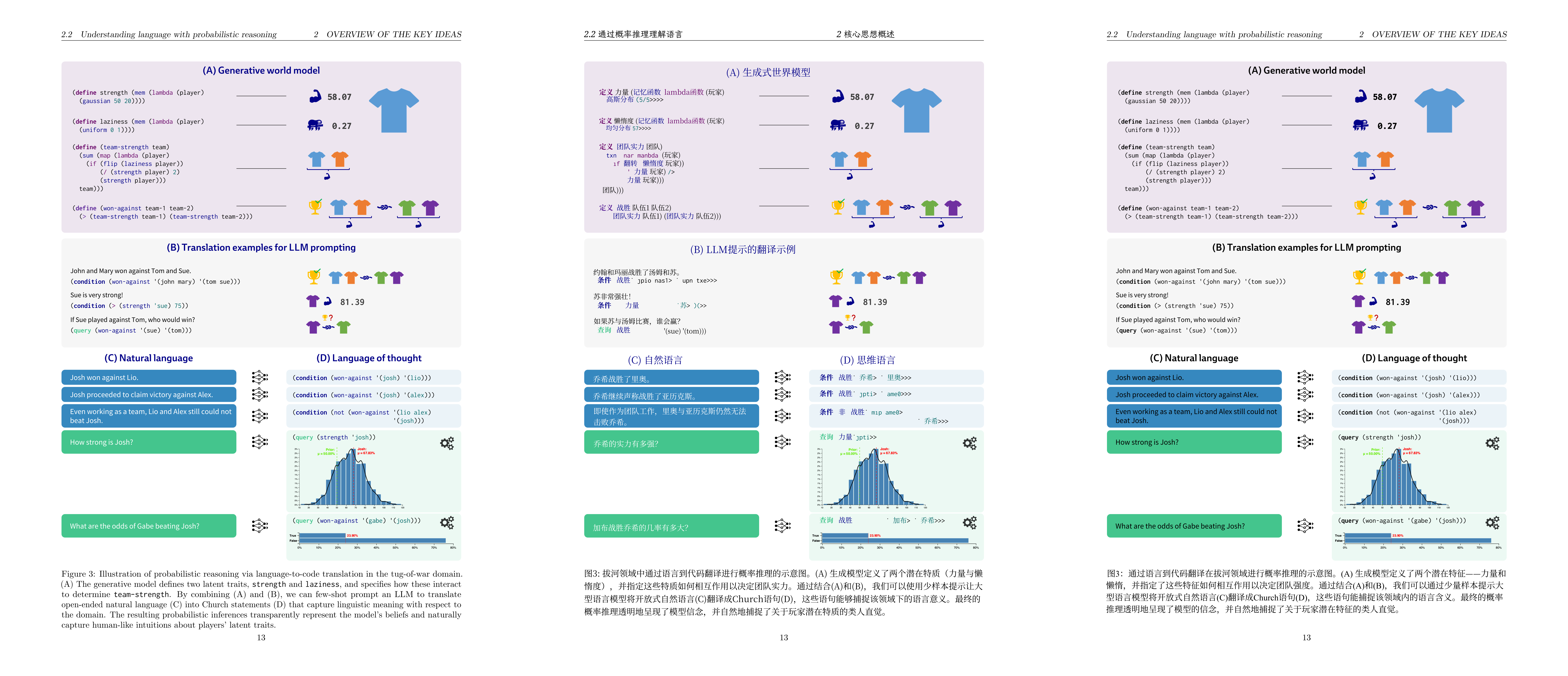
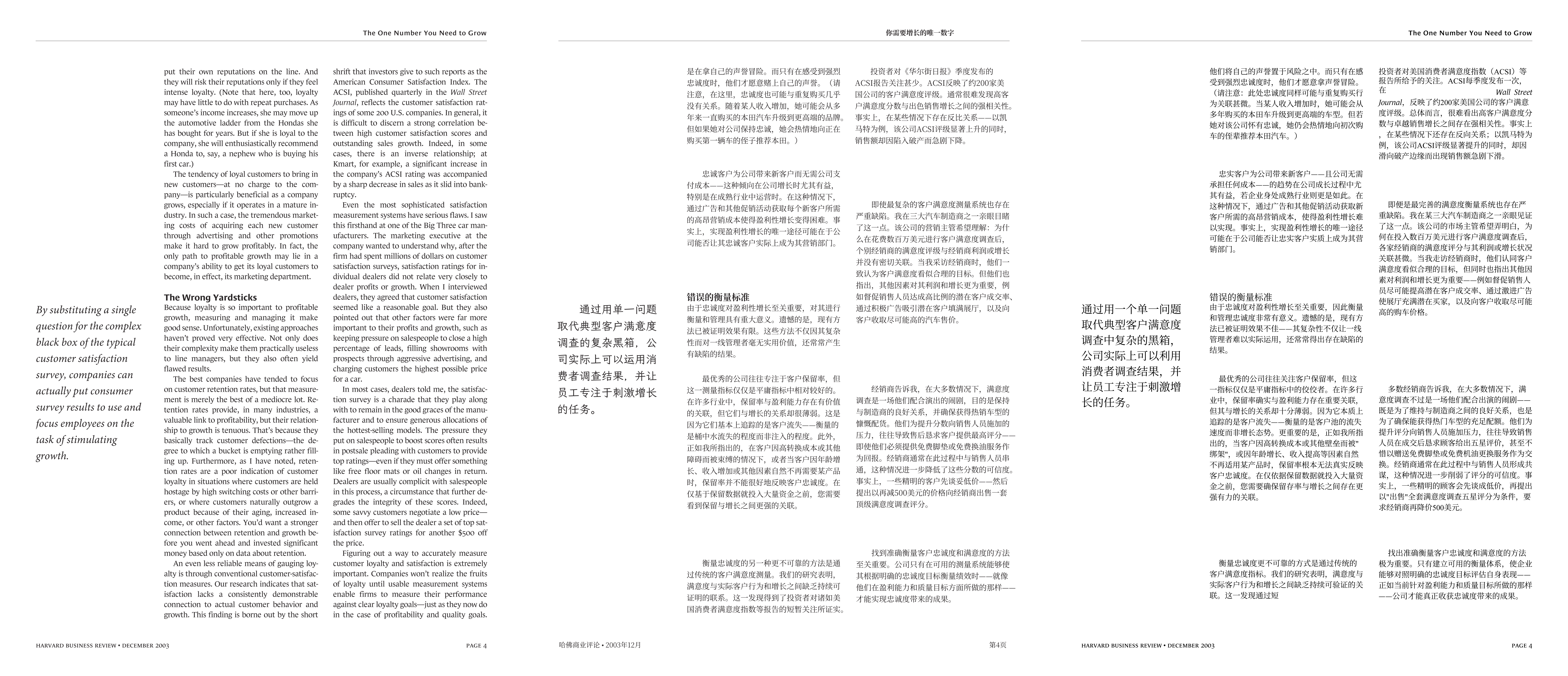
Left: original document; middle: pdf2zh_next translation; right: pdf2zh old-version translation. All translation results use Deepseek-V3.1.
Terminology Consistency#
A major upgrade in pdf2zh-next is native integration of the Glossary feature, enabled by default. Users can provide a three-column CSV file (source,target,tgt_lng), and the engine injects matched terms accurately into the Prompt during translation, forcing the model to follow consistent terminology. It can also save extracted results, greatly reducing inconsistent translations of the same concept in long documents.
In CLI, --glossaries specifies a glossary, --no-auto-extract-glossary disables automatic extraction, and --save-auto-extracted-glossary saves the automatically extracted glossary. pdf2zh also enables automatic term extraction by default, which helps keep professional terminology consistent, but it increases extra cost. By contrast, pdf2zh 1.x has no unified glossary interface, so the result depends entirely on the upstream translation service.
Test comparison: in the samples, pdf2zh-next used its glossary to translate “The One Number You Need to Grow” consistently throughout the document as “你需要增长的唯一数字.” The old version produced inconsistent renderings such as “实现增长必须掌握的数字” and “增长唯一关键数字.”
Mathematical Formula Fidelity#
Both generations treat formula and layout fidelity as a core goal. In the tests, both preserved the page-level structure of formulas, tables of contents, and figures well. But thanks to the BabelDOC engine, pdf2zh-next performs better in details. Its parsing of text, style, formulas, and layout relationships is more refined, making paragraphs with complex mathematical formulas render more cleanly and robustly.
Test comparison:
- Regular formulas: both preserve them perfectly, with no obvious difference.
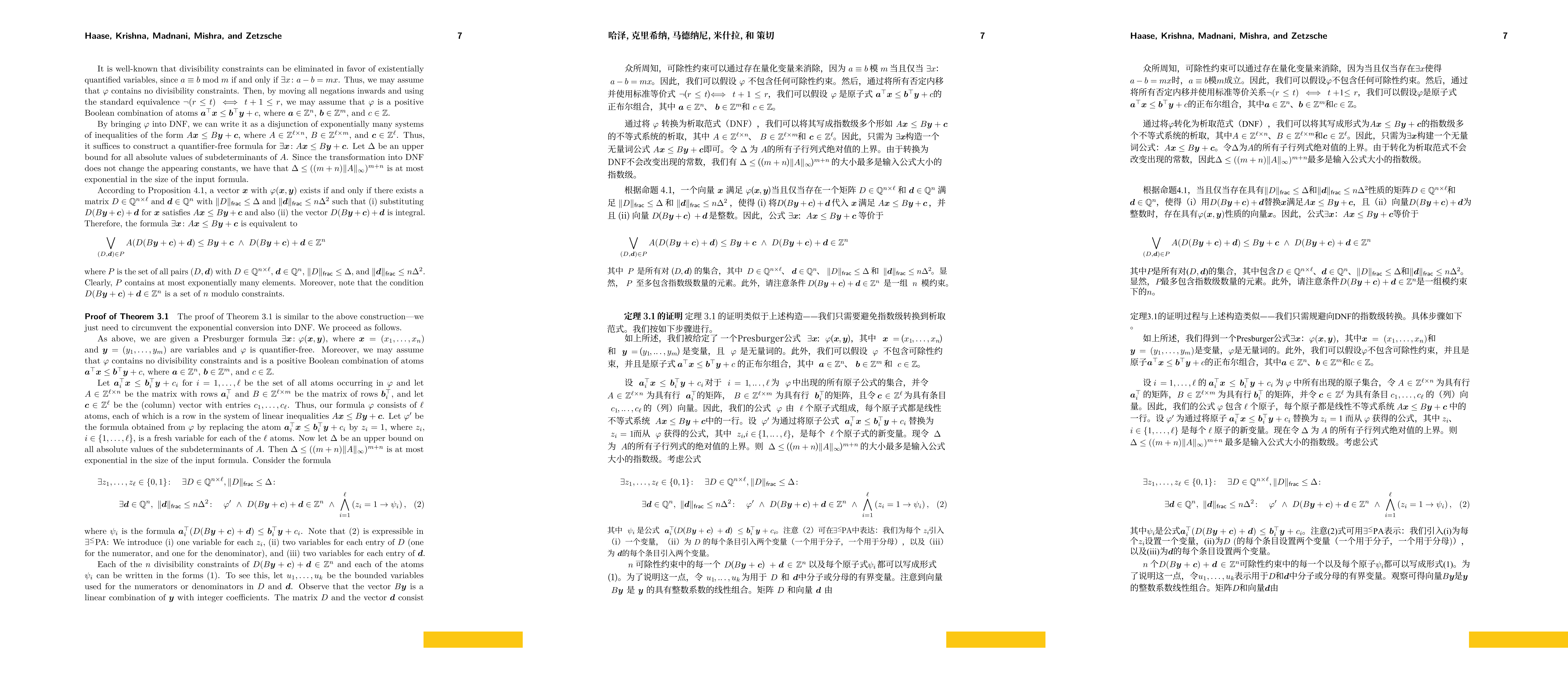
- Complex cases: in extremely complex scenes, both still show local distortion or misalignment:
- For $ rac{1}{q} \left( r + \sum_{i=1}^{m} p_i y_i \right)$, the old version renders better.
- For $\sum_{i=1}^{m} p_i y_i \equiv -r \pmod{q}$, the new version performs better. Both translate
modincorrectly as a localized term, but the new version can correct this through the glossary feature. - For $\frac{1}{\det(E)}$, the new version fails to render correctly, while the old version renders it but damages the original layout.
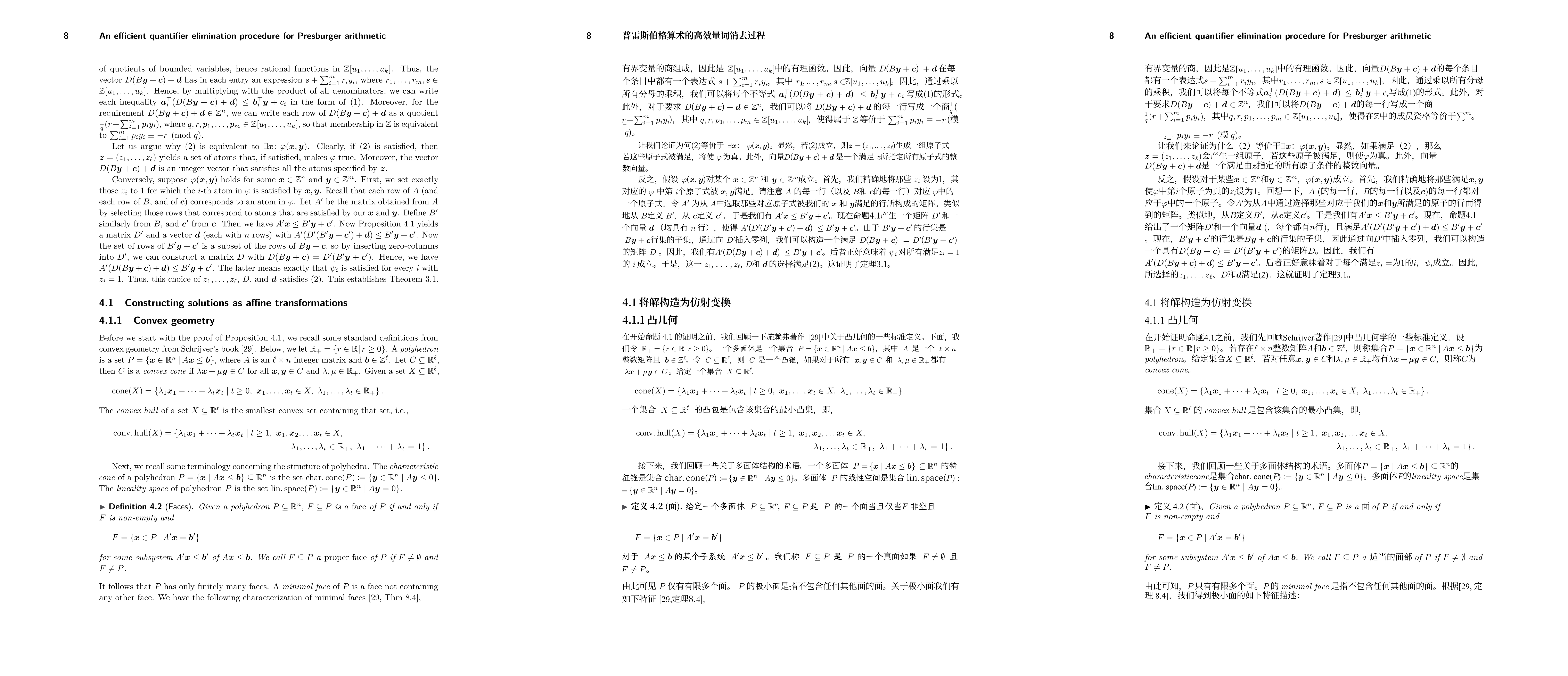
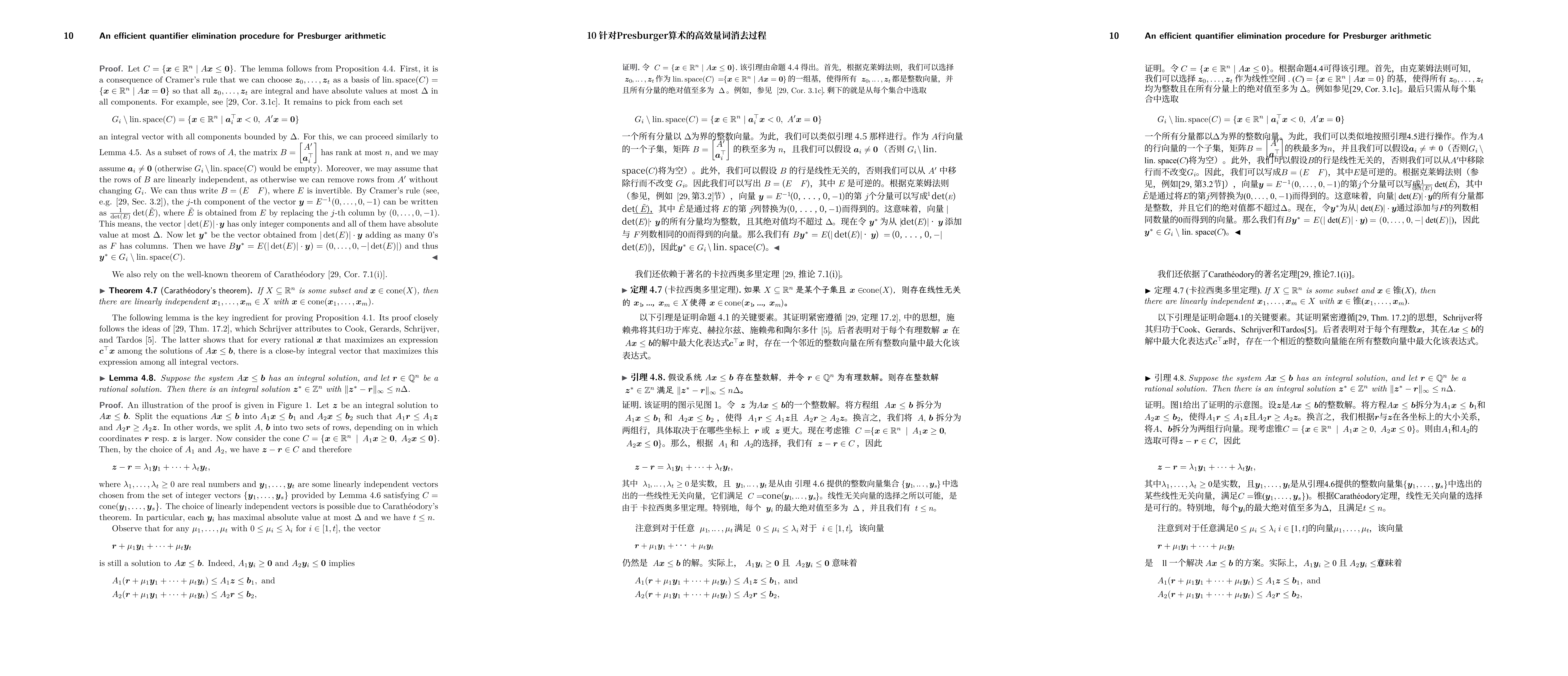
Table Translation#
pdf2zh-next adds table text translation as an experimental feature. It translates cell text while trying not to damage the original table borders. The corresponding CLI parameter is --translate-table-text. The old pdf2zh skips most tables.
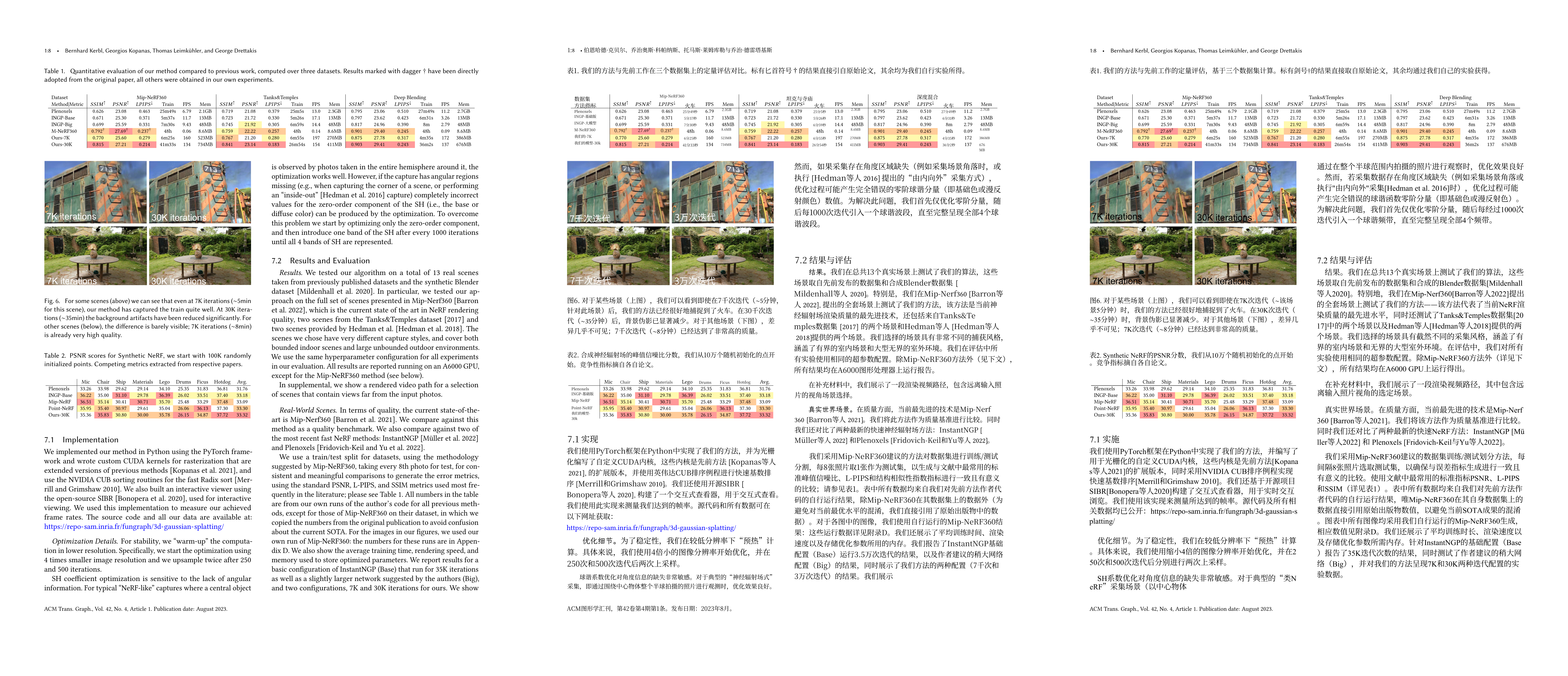
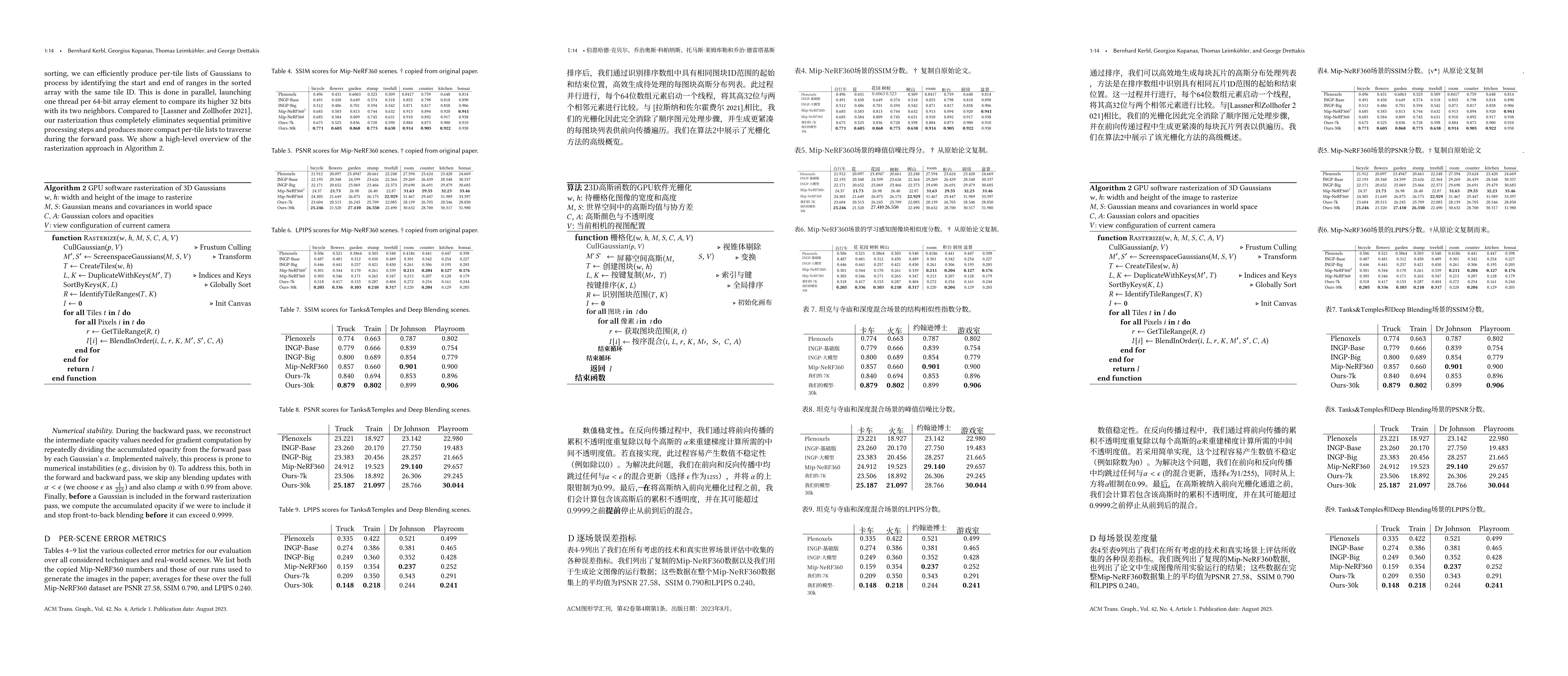
Image Translation#
For horizontal vector images that contain selectable text, pdf2zh-next can identify and translate the text fairly well.
Cross-Page Paragraph Translation#
pdf2zh-next optimizes scenarios where a paragraph is cut by page breaks or column breaks, mainly for large language models at present. It can stitch cross-page context together, improving translation coherence and semantic accuracy. The old version treats pages or columns as hard boundaries, which can split cross-page sentences awkwardly and hurt readability.
Test comparison: This finding is borne out by the short shrift that investors give to such reports as the American Consumer Satisfaction Index. spans two columns. The new version recognizes it as one complete sentence, while the old version splits it into two sentences and breaks the meaning.
Scanned Document Support#
The old pdf2zh almost does not support scanned PDFs. If forced to process them, it usually outputs overlapping and unreadable text.
pdf2zh-next provides a temporarily usable path through an OCR workaround. Pages with complex tables or formulas may still become blank, but it can already generate basically readable translations. CLI: --auto-enable-ocr-workaround True, or explicitly --ocr-workaround.
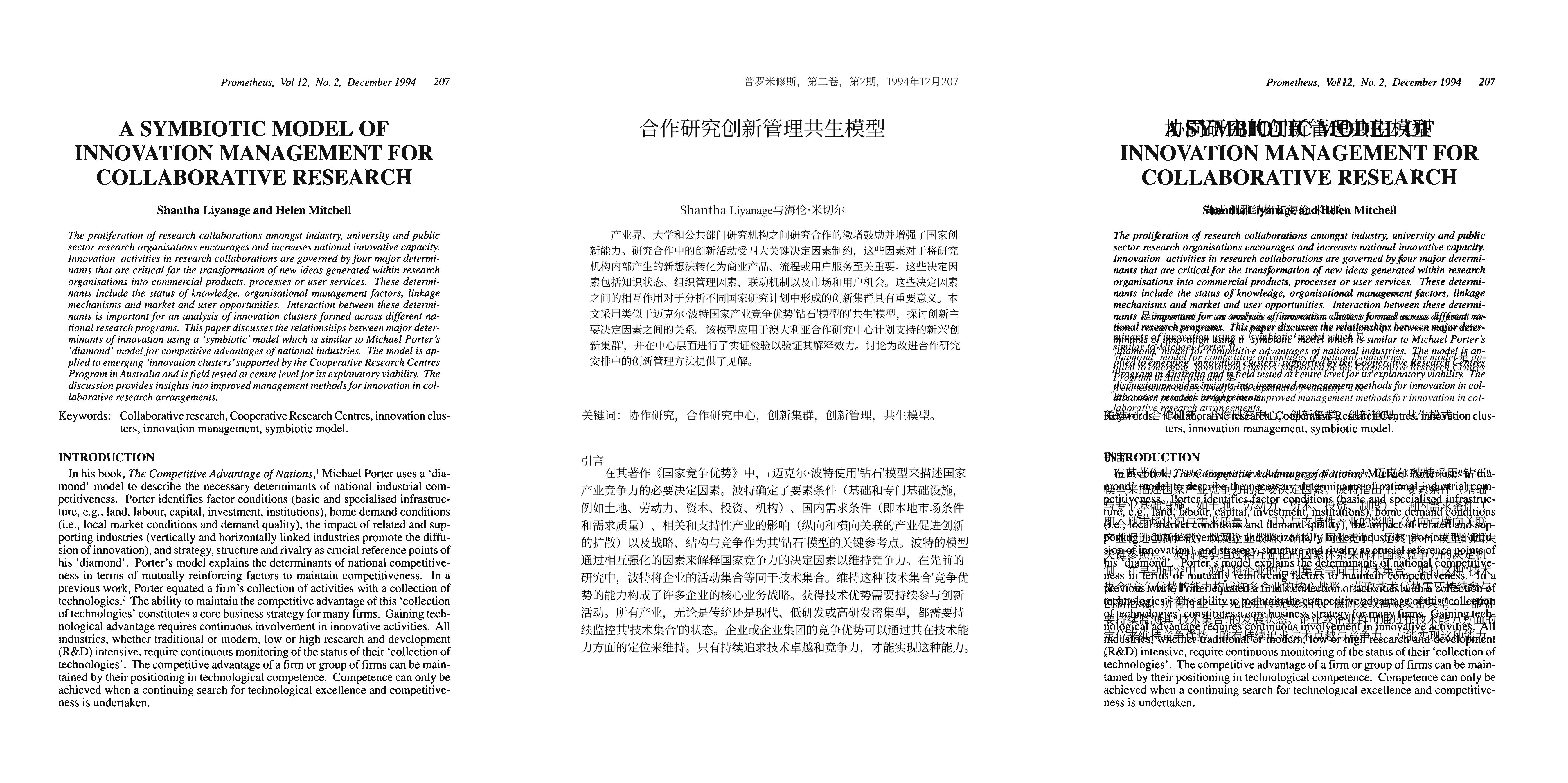
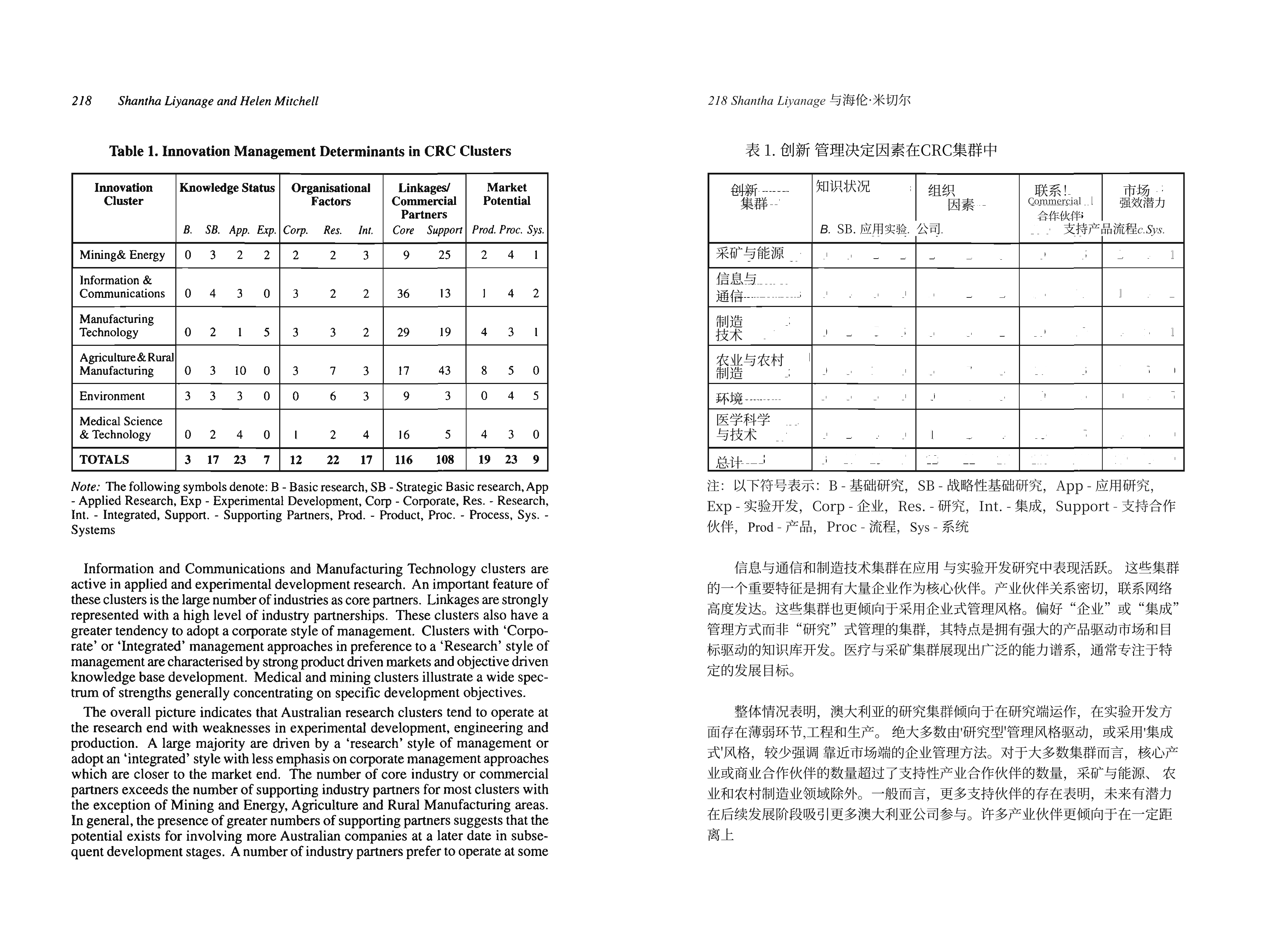
Strong recommendation: before using
pdf2zh-nextto translate scanned documents, run the document through a professional OCR tool first so the text in the PDF can be selected and copied.
Rich Text and Special Layouts#
- Rich text styles: some PDFs use colored text and other rich-text styles.
pdf2zh-nextpreserves rich-text styles by default. Use--disable-rich-text-translateto disable this. The old version often normalizes text to black. - Vertical text: the new version tends to skip vertical elements, such as publisher information or vertical tables, to avoid layout disorder. The old version shows rendering misalignment in some examples.
Part 2: Average Cost and Speed#
This comparison used DeepSeek V3.1 as the translation engine. Its official pricing, in RMB per million tokens, was: input with cache hit ¥0.5, input without cache hit ¥4, and output ¥12.
DeepSeek V3.1 Test Data#
Speed comparison
Speed is affected by local hardware, network conditions, and API provider rate limits. The following data is for reference only.
Test environment: CPU: AMD Ryzen 7 8745HS w/ Radeon 780M Graphics (3.80 GHz) RAM: 16 GB API provider: DeepSeek official
| Layout | Pages | pdf2zh (v1.x) time | pdf2zh_next time (auto term extraction enabled) |
|---|---|---|---|
| Two-column | 11 | 148s | 238s |
| Single-column | 28 | 357s | 242s |
| Single-column | 144 | 2953s | 613s |
| Two-column | 14 | 221s | 371s |
| Single-column | 18 | 272s | 214s |
| Single-column | 94 | 2341s | 557s |
| Two-column | 4 | 73s | 163s |
| Two-column scanned | 13 | 10s* | 172s |
| Single-column scanned | 18 | 220s | 172s |
| Multi-column | 12 | 106s | 102s |
| Total | 356 | 6701s | 2844s |
*The old version does not support scanned documents; the 10s result may be an early termination without calling the large model and is not meaningful for comparison.
API cost comparison
pdf2zh_next-deepseek-v3.1-chat: input cache hit 235136 tokens; input cache miss 2128116 tokens; output 869317 tokens; total cost ¥19.06.
pdf2zh old version-deepseek-v3.1-chat: input cache hit 1984 tokens; input cache miss 430277 tokens; output 251702 tokens; total cost ¥04.74.
pdf2zh_next-qwen-plus-0911 Auto term extraction on: input 2479280; output 990812; total cost ¥3.965048
Auto term extraction off: input 1464416; output 609708; total cost ¥2.3909488
pdf2zh_next-deepseek-v3.2-chat: input cache hit 238656; input cache miss 2120857; output 871172; total cost ¥6.90
Across this sample set, the total API cost of pdf2zh_next was about 4 times that of the old version.
Review Conclusions#
Speed analysis
- Overall efficiency:
pdf2zh_nextcompleted all tests in 2844 seconds, compared with 6701 seconds for the old version, giving an overall 2.36× speedup. Its average speed was 7.99 seconds/page, far ahead of the old version’s 18.82 seconds/page. - Huge advantage for long documents: on the 144-page and 94-page samples,
pdf2zh_nextwas 4.82× and 4.20× faster than the old version. - Short-document scenarios: when the page count is small, such as under 15 pages, the old version may be faster because its processing flow is simpler.
Unit cost analysis (356-page sample set)
pdf2zh_next: about ¥0.054 / pagepdf2zh (old version): about ¥0.013 / page
Conclusion
- If you want efficiency and throughput: if your core need is translation speed, especially for large PDFs over 15 pages,
pdf2zh_nexthas an overwhelming efficiency advantage. - If you are cost-sensitive: if API cost is the top concern, old
pdf2zhis much cheaper. If you want new-version features, disabling automatic glossary extraction can save about 40% of consumption.
Part 3: Free Access and No-Key Usage#
For users who do not want to configure API keys, both projects provide free paths.
Free Resources for pdf2zh (v1.x)#
- Official public free service (pdf2zh.com): no installation needed; upload online and use directly. This is the first choice for trying it.
- HuggingFace Spaces demo: backup online service.
- ModelScope Studio demo: another backup online service.
- The translation engine includes free Bing and Google options.
Free Resources for pdf2zh_next (v2.x)#
- Immersive Translate - BabelDOC: officially recommended online trial entry.
- Built-in free engine (siliconflowfree): a free LLM channel provided by SiliconFlow, currently using
THUDM/GLM-4-9B-0414, with reliable quality. - Built-in free engine (Bing / Google): also supported, but because of upstream interface restrictions, it is less stable than
siliconflowfreeand is traditional machine translation, so it is not my first recommendation.
Part 4: Maintenance Status and Community Activity#
The pdf2zh project was first created by individual developers around 2023–2024 and became popular in the open-source community at the end of 2024, accumulating more than 20k GitHub stars within a year. In mid-2025, the core development team moved the code to a new organization repository and released version 2.0. The pdf2zh-next repository inherited most of the old code and issues, but reset the version number to 2.x. For future maintenance, pdf2zh-next is the only active mainline, while the old version remains as a historical version. From a code-maintenance perspective, I recommend the new version.
Scenario-Based Recommendations#
- Scenario 1: academic research and professional reports, with strong need for terminology consistency: choose
pdf2zh-next. Its native glossary enforces consistent term translation, which the old version lacks. - Scenario 2: papers contain many complex mathematical formulas: both are usable, but
pdf2zh-nextis more stable overall. - Scenario 3: extremely cost-sensitive: prefer
pdf2zh (1.x), or disable automatic term extraction in next to reduce cost. - Scenario 4: speed is the priority: use 15 pages as a rough boundary. Over 15 pages, choose
pdf2zh-next; for very short documents, the old version may be faster. - Scenario 5: need ongoing updates and new features: choose
pdf2zh-next, the active mainline that continues to evolve.
GitHub Repositories#
pdf2zh (v1.x) GitHub repository: https://github.com/Byaidu/PDFMathTranslate pdf2zh-next (v2.x) GitHub repository: https://github.com/PDFMathTranslate-next/PDFMathTranslate-next Zotero plugin (zotero-pdf2zh): https://github.com/guaguastandup/zotero-pdf2zh
Credits#
Blog copy: Rosetears & awwaawwa Translation testing: Rosetears & awwaawwa Video recording: Rosetears
Literature Sources#
[1] Guo D, Yang D, Zhang H, et al. DeepSeek-R1 incentivizes reasoning in LLMs through reinforcement learning[J]. Nature, 2025, 645(8081): 633-638. [2] Arriola M, Gokaslan A, Chiu J T, et al. Block diffusion: Interpolating between autoregressive and diffusion language models[J]. arXiv preprint arXiv:2503.09573, 2025. [3] Murphy K. Reinforcement learning: an overview[J]. arXiv preprint arXiv:2412.05265, 2024. [4] Kerbl B, Kopanas G, Leimkühler T, et al. 3D Gaussian splatting for real-time radiance field rendering[J]. ACM Trans. Graph., 2023, 42(4): 139:1-139:14. [5] Haase C, Krishna S N, Madnani K, et al. An efficient quantifier elimination procedure for Presburger arithmetic[J]. arXiv preprint [6] Wong L, Grand G, Lew A K, et al. From word models to world models: Translating from natural language to the probabilistic language of thought[J]. arXiv preprint arXiv:2306.12672, 2023. [7] Rabiee A, Ghafoori S, Cetera A, et al. Wavelet Analysis of Noninvasive EEG Signals Discriminates Complex and Natural Grasp Types[J]. arXiv e-prints, 2024: arXiv: 2402.09447. [8] Fornell C, Larcker D F. Evaluating structural equation models with unobservable variables and measurement error[J]. Journal of marketing research, 1981, 18(1): 39-50. [9] Liyanage S, Mitchell H. A symbiotic model of innovation management for collaborative research[J]. Prometheus, 1994, 12(2): 207-224. [10] Reichheld F F. The one number you need to grow[J]. Harvard business review, 2003, 81(12): 46-55.