Background#
At the moment, Deepseek’s official servers often show a “server busy” message when usage is high. Although one university has promoted and deployed a full-strength Deepseek for college students across China, that full-strength version is only Deepseek-v3, not Deepseek-R1, namely “DeepSeek-R1-Distill-Qwen-32B,” and the latter’s experience is not ideal. For details, see full-strength v3: Da Xiansheng (for usage, refer to Da Xiansheng platform access and Deepseek model usage guide). Eventually, I found Alipay Treasure Box, where you can try both the full-strength Deepseek-R1 and Deepseek-v3 at the same time.
Steps#
First visit the Treasure Box website, click “Use Professional Version,” scan the QR code with Alipay to log in, and follow the prompts to confirm everything. Then you can start using it.
Advanced Use#
First, you can upload your own documents to the knowledge base. Then create a new app, choose “conversation,” and set the model to Deepseek-R1 associated with the knowledge base. This lets the app read your documents. You can also configure prompts, personalized conversation options, and more. The app can be published or kept unpublished. If you publish it, you can use your custom app in mini-program interfaces and similar places.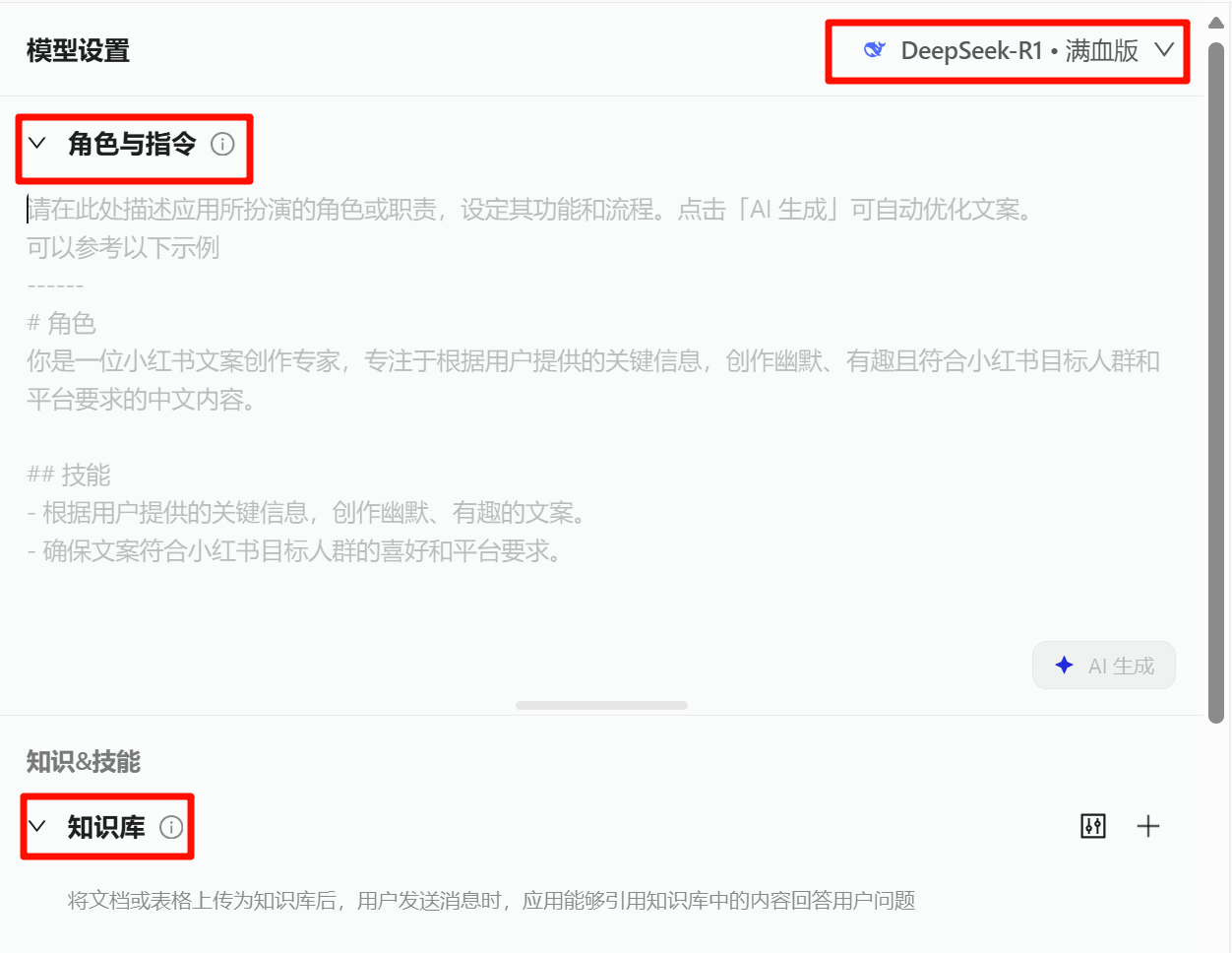
There is also a workflow app that lets you set branches and add plugins such as Quark Search and Amap. This can greatly improve work efficiency. I recommend exploring and configuring it further to get the best experience.