
Steps#
- Analyze — Scale — Reliability Analysis
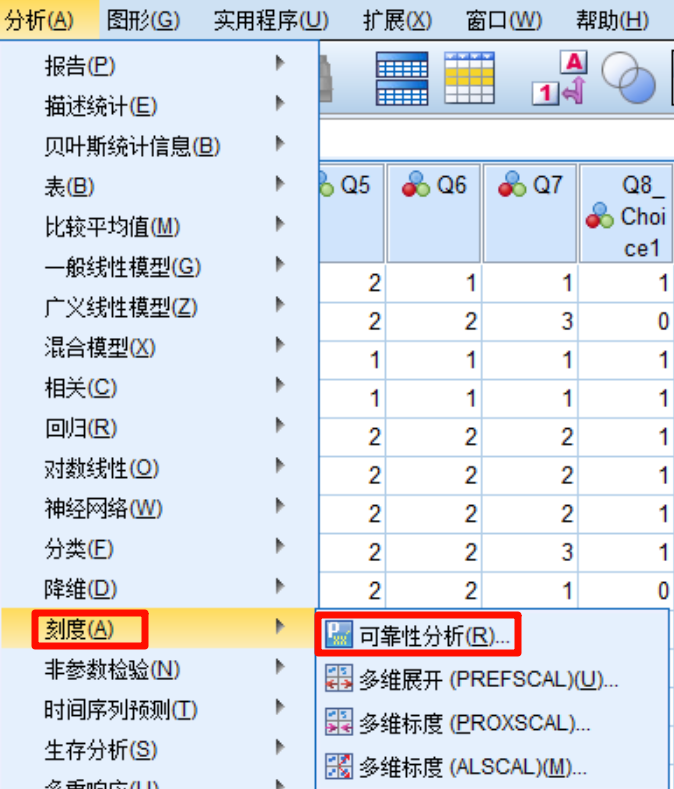
- Drag the scale items into the box, first by individual dimension and then overall.
- Statistics — under “Descriptives,” select “Scale if item deleted.”

- Continue — OK.
- Draw the final table as follows:

Concept Explanation and Result Interpretation#
Cronbach’s Alpha#
Definition: Cronbach’s alpha (Cronbach’s α) is a commonly used indicator for measuring the internal consistency of a scale.
Standards:
- α ≥ 0.9: excellent
- 0.9 > α ≥ 0.8: good
- 0.8 > α ≥ 0.7: acceptable
- 0.7 > α ≥ 0.6: still has some reliability, but interpret with caution
- 0.6 > α: insufficient reliability; consider revising or deleting some items
Agbo A A. Cronbach’s Alpha: Review of Limitations and Associated Recommendations[J]. Journal of Psychology in Africa, 2010, 20(2): 233-239.
If alpha increases after deleting an item
- You can directly delete that item and run the analysis again.
- Check the questionnaire and remove invalid responses with very short completion time or excessive repeated answers.
- If the alpha increase after deletion is small, such as +0.05, keep the item.
- Run exploratory factor analysis (EFA). If communality or factor loading meets the standard, such as communality > 0.3 and loading > 0.4, keep the item.
You can make a table in the following style:
| Dimension | Reliability | Validity |
|---|---|---|
| Dimension 1 | xx | xx |
| Dimension 2 | xx | xx |
| Dimension 3 | xx | xx |
| Overall | xx | xx |
Watch the original video here: 【SPSS】Reliability analysis — reliability test _ Bilibili